
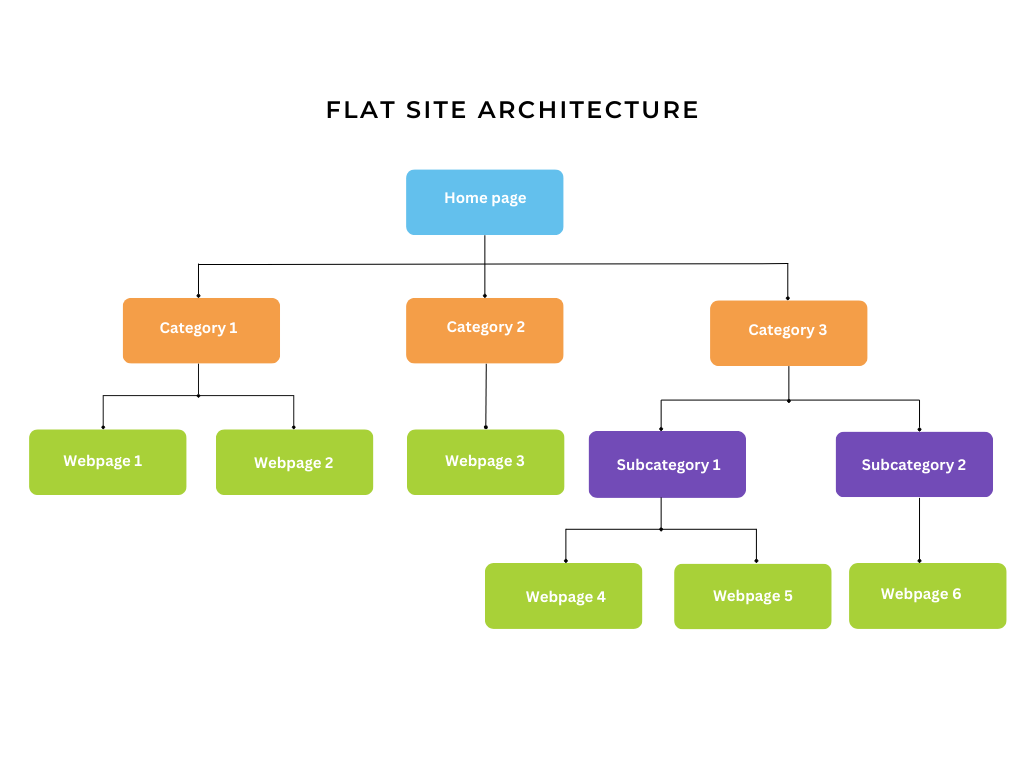
The architectural blueprint of your WordPress permalinks fundamentally dictates how search engine crawlers map and index your content. A flat URL architecture (e.g., [domain.com/post-name/](https://domain.com/post-name/)) places every article at the root level, minimizing click depth and simplifying the backend database routing. In contrast, a silo category structure (e.g., [domain.com/category/post-name/](https://domain.com/category/post-name/)) enforces strict hierarchical taxonomy, clustering related topics into isolated vertical hubs. While flat architectures are effortless to maintain, they offer zero contextual URL cues to search engines. Silo structures pass intense topical relevance through nested directories, making them superior for scaling large multi-niche domains like orglu.com or zensprit.com. This technical guide outlines exactly how to configure your WordPress database routing for both architectures, properly categorize content, and deploy automated internal linking tools to solidify your structural logic without triggering devastating 404 permalink conflicts.
Prerequisites Before You Begin
Before altering your database routes or taxonomy mapping, ensure you have the following access levels and plugins ready:
-
Administrator-Level WordPress Access: Full capabilities to modify global permalink structures and taxonomies.
-
Database Backup: A fresh
.sqlexport of yourwp_optionsandwp_poststables. Changing permalinks on an established site instantly alters all database routes. -
Redirection Engine: An active plugin (like Redirection or RankMath) to monitor and automatically map 301 redirects if you are migrating existing posts from a flat to a silo structure.
-
Internal Linking Tools: Installed configurations of Link Whisper or Internal Link Juicer to enforce contextual clustering post-deployment.
-
Classic Editor: (Optional but recommended) for straightforward meta-box management when assigning parent/child category hierarchies on the publishing screen.
Step-by-Step Solutions
Method 1: Configuring a Flat URL Architecture (The High-Velocity Approach)
A flat structure strips away category paths, making URLs short and highly portable if you ever reorganize your content taxonomy (e.g., moving a tech troubleshooting guide to a different hub on androidvirales.com without breaking the URL).
Step 1: Strip Category Bases in Permalink Settings Navigate to Settings > Permalinks in your WordPress dashboard. Under the “Common Settings” section, select the Post name radio button. This configures the $wp_rewrite global object to output URLs strictly as /%postname%/. Click Save Changes at the bottom of the screen.
Step 2: Rely on Tags and Categories for Internal Routing Only Because the URL no longer provides topical context, you must rely on WordPress taxonomies purely for frontend navigation. When drafting an article in the Classic Editor, assign it to a single broad category. Do not nest sub-categories, as the URL will ignore them anyway.
Step 3: Enforce Contextual Clusters via Link Whisper Without URL silos, internal linking becomes your only topical clustering mechanism. Open the Link Whisper plugin dashboard. Navigate to the “Auto-Linking” module. Create rule sets mapping specific keywords to your cornerstone pages. This artificially creates a “virtual silo” through interconnected hyperlinks despite the flat URL structure.
Method 2: Constructing a Strict Silo Category Structure (The Topical Authority Approach)
Silo structures are essential for finance hubs like finauralywin.com or business sites like febgrow.com, physically nesting URLs into topical folders to pass intense relevance to parent categories.
Step 1: Define the Custom Permalink Structure Navigate to Settings > Permalinks. Select the Custom Structure radio button. In the text field, explicitly input /%category%/%postname%/. This forces WordPress to parse the assigned category slug and inject it directly into the URL path before the post slug. Click Save Changes to flush the rewrite rules.
Step 2: Build the Hierarchical Taxonomy Navigate to Posts > Categories. You must construct a strict parent-child relationship. Create a parent category (e.g., “Personal Finance”). Then, create a child category (e.g., “Trading Strategies”) and assign “Personal Finance” via the Parent Category dropdown. When assigning a post to this taxonomy, check only the deepest child category to prevent URL duplication.
Step 3: Automate Intra-Silo Linking with Internal Link Juicer A silo is easily broken if you link excessively between different vertical pillars. To prevent topical bleeding, navigate to the Internal Link Juicer settings. Configure the “Whitelist” settings to strictly limit automated internal links so they only trigger between posts sharing the exact same parent category. This seals the silo, trapping PageRank within that specific topical cluster.
Troubleshooting Common Pitfalls
If you deviate from the standard architecture or encounter 404 routing failures post-deployment, refer to this diagnostic table:
3 Common Mistakes Users Make During This Process
-
Changing Structures on an Established Site Without Redirection: Switching from a flat structure to a silo structure instantly alters the database routing for every published post. Failing to map 1-to-1 301 redirects beforehand will instantly destroy years of SEO traffic and trigger massive 404 cascades.
-
Creating Overlapping Categories that Dilute the Silo: Creating identical intent categories (e.g., having both a “Finance” and a “Money” root category) forces posts to overlap. This dilutes the silo’s keyword relevance and causes canonicalization conflicts.
-
Linking Wildly Across Silos: Linking a cooking post directly to a crypto trading post without a contextual bridge confuses search engine topical modeling. If you utilize a silo, your internal links must primarily point up to the parent category or sideways to sibling posts within the same vertical.
Final Thoughts
Choose your URL architecture before publishing your first post. Flat URLs offer agility for rapid publishing and clean domain-level authority, while strict category silos generate unparalleled topical relevance for complex, multi-niche environments. Whichever route you select, rigorously map your internal links to reinforce your hierarchy and protect your crawl budget.